
From Search Bars to Chatbots: Decoding User Expectations for AI Chat
SUMMARY
AI chat may be generating headlines, but our research shows that user expectations have not changed as quickly as the technology. Across every age group, participants consistently turned to search, FAQs, and trusted sources before engaging with chat. The most successful AI experiences were transparent, easy to verify, and designed to support users, not replace existing pathways. The takeaway is simple: organizations build trust when they meet users where they are and design AI experiences around real human behavior.
Table of Contents
- How we conducted the research
- Five universal behaviors we observed
- Five surprising findings
- Five ways to overcome chat skepticism
- The bottom line: Meet users where they are
AI chat is everywhere. Boards are pushing for it. Vendors are selling it. Digital teams are scrambling to implement it. But before you drop a chat bubble in the bottom-right corner of your site and call it a day, there's something you should know: your users probably aren’t seeking it out.
That's one of the key findings from a usability study we conducted, where we set out to understand how real users interact with AI-powered search and chat experiences, and what actually builds (or destroys) their trust.
How We Did the Research
We ran moderated usability tests via Zoom with 9 participants ranging in age from 11 to 73. Using a think-aloud protocol, participants completed realistic tasks across a variety of AI and chat implementations on general audience websites. They then reflected on their experience in a short survey. Our sample spanned multiple age groups, gender identities, and orientation to tech giving us a broad cross-section of everyday users.
We tested five types of experiences:
- Search with AI elements — Google's AI Overview and AI Mode
- Generative AI — ChatGPT 5.2
- Transactional chat — Chipotle's "Pepper" chatbot
- Hybrid (AI with human escalation) — Frigidaire's "Pixie" assistant
- Domain-specific AI — OpenTable's Concierge and the IRS Interactive Tax Assistant
We also created a custom wireframe prototype with four variations of a help interface, stripped of any brand familiarity, to isolate how layout and content structure affect user behavior.
5 Universal Behaviors We Observed
1. Users Look for Search First
Even before navigation. Even before chat. Even before reading the page. When users needed help, they looked for a search bar. One participant literally said: "Where's the magnifying glass?" When search wasn't available or failed, users felt lost and frustrated.
2. Google Still Wins the Trust Game
Participants trusted Google's AI summaries more than standalone AI tools. The reasons were consistent: citations, source links, and a familiar interface they've used for years. Familiarity breeds trust, and Google has had a long time to earn it.
3. Nobody Takes AI at Face Value
Participants used AI as a starting point, not a final answer. This was especially true for medical topics, financial questions, and anything high-stakes. Phrases like "double check" and "verify elsewhere" appeared in every single session, across every age group.
4. FAQs and Search Are Preferred
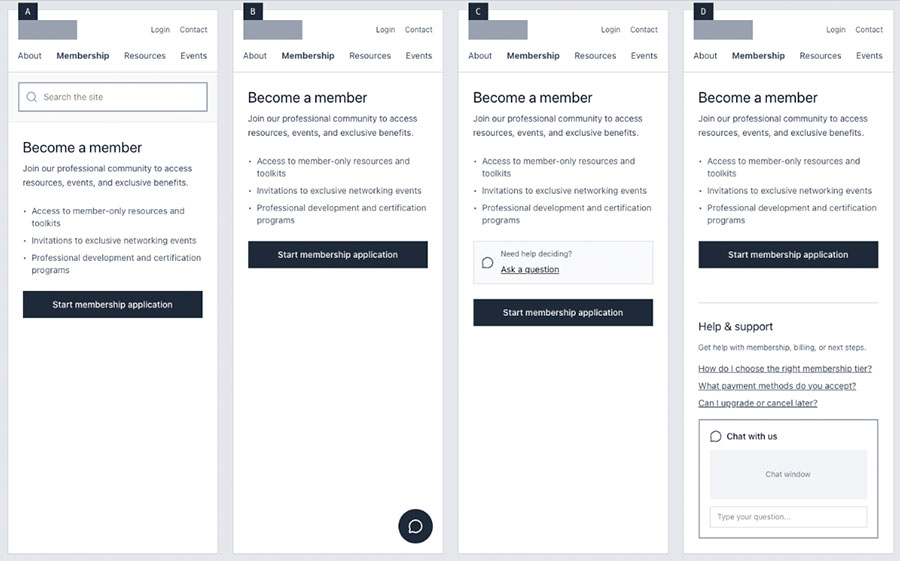
When we showed participants four wireframe variations of a help interface, Option D, which combined a search bar, contextual FAQs, and chat, was rated the most comprehensive and trustworthy. Why? It anticipated their needs, offered multiple ways to get help, and was easy to use. It signaled that the organization had actually thought about what users might need.
5. People Have Chat Baggage
This is perhaps the most important finding. Users arrive at your website carrying a history of bad chat experiences, like bots that couldn't understand questions and wasted their time. Those experiences shaped their expectations before a single interaction even started, leading to active avoidance and low confidence in chat tools.
5 Surprising Things We Didn't Expect
Nobody Was Looking for Chat
Despite all the hype around AI chat, users consistently tried search or navigation first. Chat was usually a last resort. Even when we explicitly asked participants to use the chat feature, many hunted around in the nav first. One participant, when asked to use Frigidaire's chat to schedule service, asked, “Is there a different way I could do it?”
Age Expectations Were Reversed
We assumed more tech-savvy younger users would trust AI more. The opposite was true. Our 73-year-old participant was comfortable and impressed with Google's AI for medical research. He called himself a "technology dinosaur" but was comfortable with the results. Meanwhile, our 11 and 15-year-old participants were immediately skeptical, wanting authoritative sources and human verification. The 11-year-old's response to using AI for medical symptoms? "I would ask a doctor."
Why the reversal? Younger users have been told repeatedly by teachers and educators not to trust AI for schoolwork. They may have also encountered more hallucinations or incorrect answers.
The IRS Beat ChatGPT
In every session, the IRS Interactive Tax Assistant was rated more trustworthy than ChatGPT and sometimes even beat Google. The reason: authority beat interface polish. The government is the authoritative source on tax questions. Users trusted that the answers were correct, and they kept trying even when the tool returned zero results. They assumed the information was there somewhere. Source credibility matters.
Users Form Queries Differently for AI vs. Search
On Google, one participant described their approach as "caveman speak,” just three or four keywords. On ChatGPT, the same user wrote full sentences with punctuation and capitalization. This intuitive shift in behavior suggests users already understand different interaction models. As you design search and chat experiences, consider how your users will phrase their inputs and whether your system can handle both styles.
Standard Chat Placement Didn't Work
The bottom-right chat bubble, the convention we've all accepted, was frequently missed or ignored. Chipotle's "Pepper" is a perfect example: a red floating button with no context about what it does. If users don't know what it is, they won't use it. The real question isn't "How do we design better chat?", it's "When do users actually want chat?"
5 Tips for Overcoming Chat Skepticism
1. Position Chat as Backup
Design help in layers: Search → FAQs → Chat. Chat should feel like "Still stuck? Talk to us." rather than the first thing users encounter. In follow-up research on an association website, AI-enhanced search outperformed chat framing entirely. Meet users where they already are, then introduce chat as a secondary option.
2. Don't Hide the AI. Explain It.
Users aren't afraid of AI. They just want to know it's there. Show sources, citations, and confidence levels. Clearly label AI interactions in multiple places.
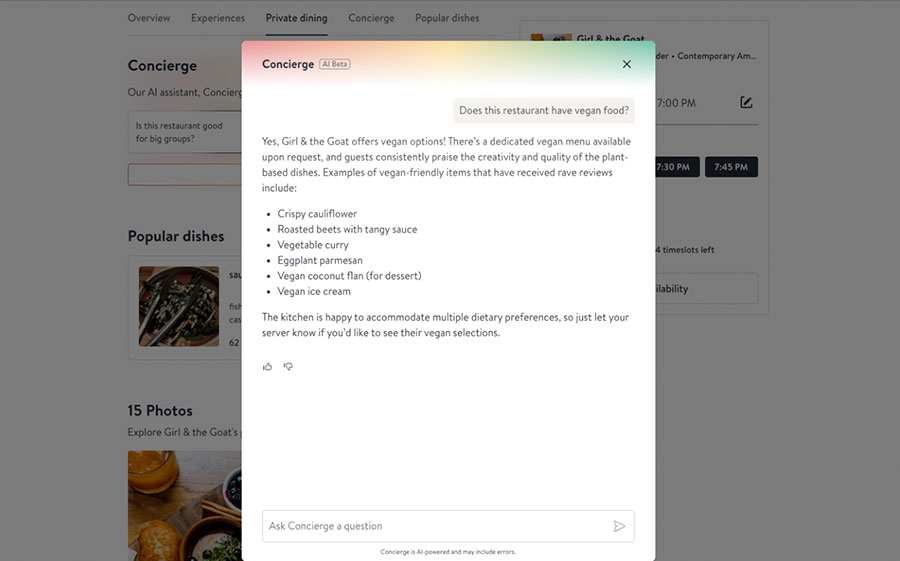
Consider statements like "This AI response is based on X."
Bonus if not disappointing tip: Don't use a fake photo or a cute name. Chipotle's "Pepper" and Frigidaire's "Pixie" both reduced discoverability and eroded trust. Users know it's not a person and when you pretend otherwise, you break the relationship before it starts.
3. Design a Seamless Human Handoff from Day One
If your chat transitions to a human agent, plan it carefully:
- Build clear escalation triggers (“Let me connect you with a specialist”)
- Maintain chat history during transfers. Users don't want to repeat themselves.
- Train human agents to acknowledge the prior AI conversation rather than starting over.
- Set expectations about wait times upfront. People are surprisingly patient with even 20-minute wait times if their expectations are managed.
4. Give Users a Starting Point
An empty chat box is intimidating. Instead, provide 3–5 common questions, quick actions, or guided prompts to show users what the tool can do. OpenTable's Concierge does this well with pre-populated questions like: Does this restaurant have vegetarian options?
Help users understand the tool's capabilities immediately. Allow open text as a secondary option, but give people a helpful hand first.
5. Test With Actual Users
Chat discoverability matters more than following design patterns that may not work for your audience. Test different positions, framings, and interfaces with your specific user base and content context. What works for one site or one demographic may not work for yours. And keep testing: user expectations around AI are evolving rapidly, and the research you do today may look very different in six months.
The Bottom Line
The question isn't “How do we get users to use our chatbot?” It's “Are we meeting users where they actually are?”
Users still want search. They still want FAQs. They want to find the answer themselves before they're forced to ask for help. When chat is positioned as a thoughtful backup and is transparent, well-labeled, and easy to discover it can earn trust and be valued. When it's dropped in a corner with a cute name and no context, it gets ignored.
Keep testing. Keep listening.
Curious whether AI chat is the right fit for your audience? Test it with real users and uncover what builds trust, drives engagement, and delivers meaningful results. Let’s talk!
Alma Meshes (Sr. UX Architect) and Emily Kodner (VP of Client Delivery) presented this research at DrupalCon Chicago 2026.